All Premium features are free until December 31, 2026.Install now and use everything for a year — no license required.
SearchAli Monitoring

Find Elasticsearch bottlenecks before your users do.

No agent. No signup. No data leaves your machine. Connect a cluster in 10 seconds and see the slow query in the first minute.

Setup in 10 seconds · Premium free until December 31, 2026

Official Elastic Partner · Built by the consultancy behind Elasticsearch infrastructure for Turkcell, Sahibinden.com, BTK, GİB, Etstur and Zain Telecom.
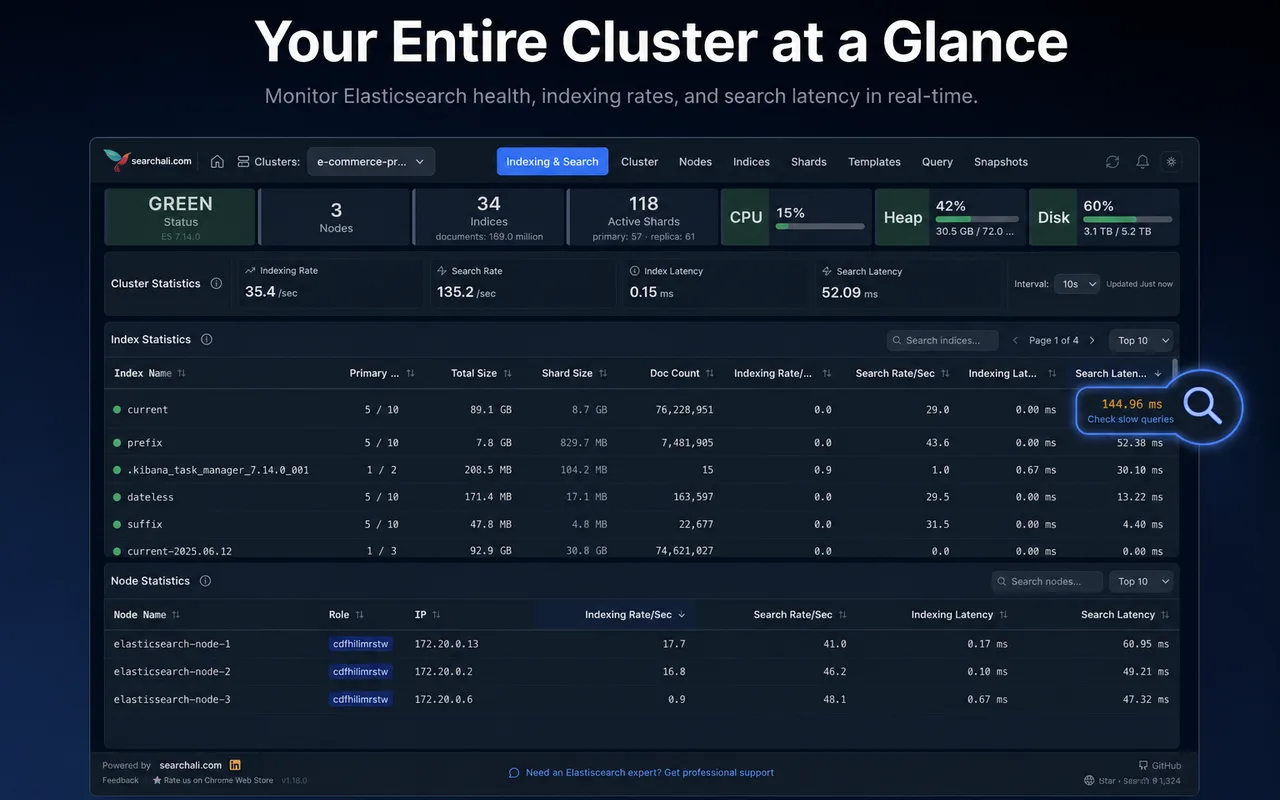
SearchAli Monitoring panel: cluster health, indexing/search metrics and node statistics

Overview

SearchAli Monitoring (Elasticsearch Performance Monitoring) is a Chrome extension designed to track Elasticsearch cluster performance in real time — especially indexing rate, search rate, indexing latency and search latency. Add multiple clusters, switch between them in one click, and run the whole operation from your browser.

Real-time metrics

Track index/search rate and latency values live.

Slow query detection

Move from high-latency signals into slow-query inspection.

Cluster resources

See CPU, heap and disk usage at a glance.

Long-running tasks

Follow reindex, recovery and snapshot progress live.

Multiple clusters

Add multiple clusters and switch between them in one click.

Cluster health

Track status, shard distribution and node statistics.

Actionable alerts

Get instant alerts with configurable rules and remediation hints.

How it works

Watch a short demo of the extension on a real cluster.
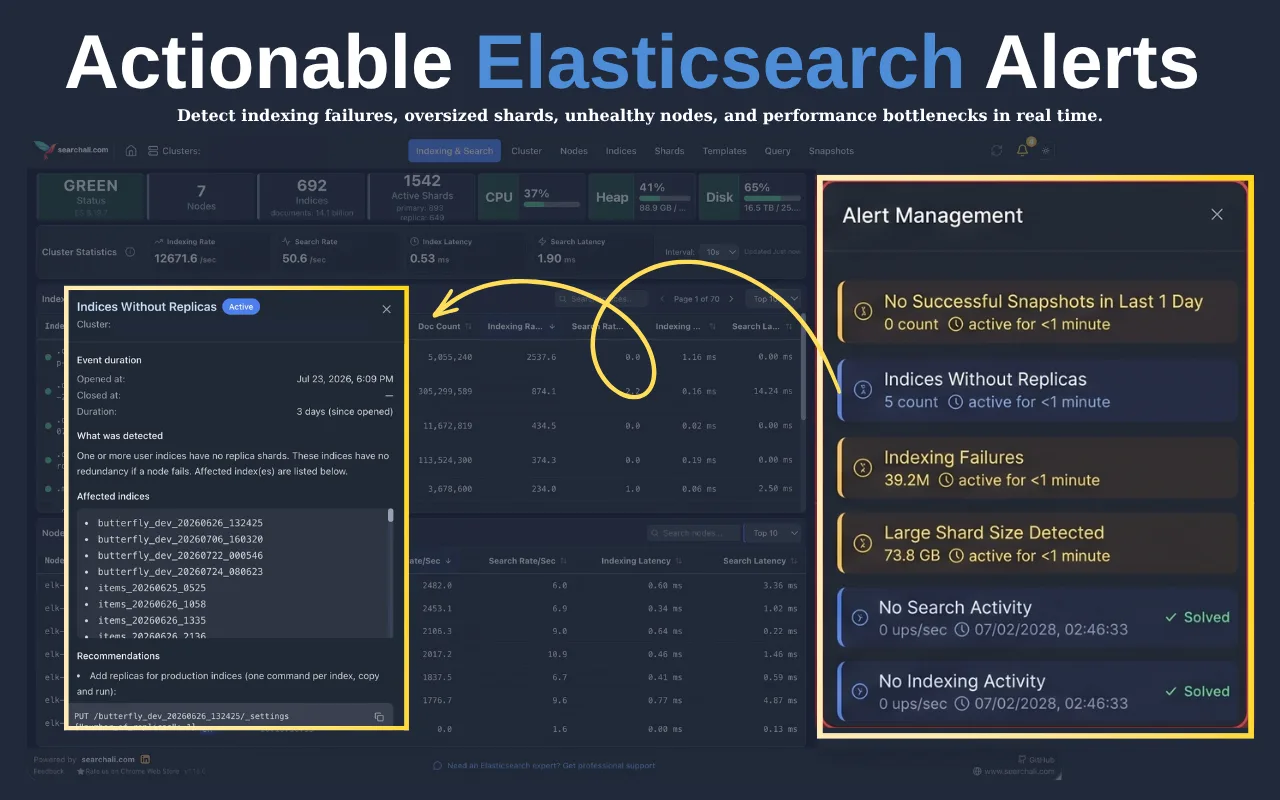
SearchAli Monitoring actionable alerts — indexing failures, oversized shards, and unhealthy nodes

Why this extension?

Official Stack Monitoring is comprehensive; for a quick look or keeping a panel open all day it is often too heavy. This extension surfaces the critical operational metrics from the browser icon in one click.

Compare

Compare plans

Feature
Free
Premium
Enterprise
Clusters
1
Unlimited
Unlimited
Cluster health, node and index stats
Yes
Yes
Yes
Indexing / search rate and latency
Yes
Yes
Yes
CPU, JVM heap, disk usage
Yes
Yes
Yes
Switch between clusters
Yes
Yes
Slow query detection
Count
Full query body and profile
Long-running tasks
First 2 tasks
All, with cancel
All, with cancel
Unassigned shard analysis
Count
Allocation explain
Allocation explain
Field usage stats
Yes
Yes
Traffic map and HTTP clients
Yes
Yes
Snapshot detail
Status
Shard-level detail and failures
Alerts
Yes
Yes
Time chart (Discover)
Yes
Yes
Invoicing and purchase orders
Yes
Priority support
Yes
Team onboarding
Yes

Clusters

Free
1
Premium
Unlimited
Enterprise
Unlimited

Cluster health, node and index stats

Free
Yes
Premium
Yes
Enterprise
Yes

Indexing / search rate and latency

Free
Yes
Premium
Yes
Enterprise
Yes

CPU, JVM heap, disk usage

Free
Yes
Premium
Yes
Enterprise
Yes

Switch between clusters

Free
Premium
Yes
Enterprise
Yes

Slow query detection

Free
Count
Premium
Full query body and profile
Enterprise
Full query body and profile

Long-running tasks

Free
First 2 tasks
Premium
All, with cancel
Enterprise
All, with cancel

Unassigned shard analysis

Free
Count
Premium
Allocation explain
Enterprise
Allocation explain

Field usage stats

Free
Premium
Yes
Enterprise
Yes

Traffic map and HTTP clients

Free
Premium
Yes
Enterprise
Yes

Snapshot detail

Free
Status
Premium
Shard-level detail and failures
Enterprise
Shard-level detail and failures

Alerts

Free
Premium
Yes
Enterprise
Yes

Time chart (Discover)

Free
Premium
Yes
Enterprise
Yes

Invoicing and purchase orders

Free
Premium
Enterprise
Yes

Priority support

Free
Premium
Enterprise
Yes

Team onboarding

Free
Premium
Enterprise
Yes

Free shows you the problem. Premium helps you solve it. Enterprise adds invoicing and priority support.

Pricing

Pricing

One license per person. Unlimited clusters. No surprises.

Free

Trying the product and monitoring a single cluster.

$0
  • 1 cluster
  • Cluster health and node stats
  • Indexing / search rate and latency
  • CPU, heap, disk usage
  • Slow query and long-running task counts
Add to Chrome — free

Enterprise

Custom

Per-person licensing with invoicing.

Custom pricing
  • Everything in Premium
  • Priced per person
  • Invoicing & PO
  • Priority support
  • Team onboarding

Tell us how many people need access and we will send a quote.

Talk to us
Early access

Premium early access

License sales are not open yet. Join the list and we will notify you before the free period ends.

Privacy

Your data never leaves your machine

We run no servers

The extension connects directly to your cluster. There is no SearchAli system in the path.

Credentials stay local

Your credentials are stored only in your browser's local storage. They are never transmitted.

Responses never leave

Elasticsearch responses are never sent anywhere. There is no telemetry.

Offline licenses

License keys are verified offline. Activation does not require an internet connection.

Frequently asked questions

What is SearchAli Monitoring?
A Chrome extension published by SearchAli (Chrome Web Store name: Elasticsearch Performance Monitoring). It lets you monitor Elasticsearch cluster health, indexing/search rates, latency, resource usage and alerts in real time from your browser.
How is it different from official Stack Monitoring?
Stack Monitoring is a full monitoring stack. This extension surfaces the most critical operational metrics in a lightweight UI from the browser icon — built for quick looks and keeping a panel open all day.
Is my cluster data sent to SearchAli?
No. The only system the extension talks to is your cluster. Cluster addresses and credentials are stored on your device only, and Elasticsearch responses are never transmitted. Details are in the privacy policy.
How do I connect to my production cluster from a browser?
The extension connects directly to your cluster using Chrome extension permissions — no proxy or CORS configuration is needed. If you use HTTPS, your browser must trust the cluster’s SSL certificate. With a self-signed certificate, add it as trusted in your operating system or browser. Your cluster must be reachable from the network your browser is on; clusters behind a VPN work while the VPN is connected.
Which Elasticsearch versions are supported?
Elasticsearch 7, 8 and 9 — self-hosted, Elastic Cloud and managed services. Some features appear only on versions that expose the relevant API (for example health report and data streams).
Which metrics does it track?
Cluster health, node/index stats, indexing and search rate/latency, CPU/heap/disk, long-running tasks (e.g. reindex), actionable alerts, and query/document/field exploration.
Is Premium paid right now?
No. All Premium features are free until December 31, 2026. After that date a license key will be required. If you install now, you get everything without paying anything.
What counts as a cluster?
Every distinct cluster address you add to the extension counts as one cluster. Free includes one; Premium has no limit.
How does the license key work?
After purchase you receive a key. You paste it into the Premium dialog inside the extension. Verification happens offline, so it keeps working without an internet connection until the key expires.
Do you support invoicing and company licenses?
That is what the Enterprise plan is for — still priced per person, with invoicing. Pick Enterprise / invoicing in the form, tell us how many people need access, and we will send a quote.
When do the AI features arrive?
It is the next major item on our roadmap. Premium subscribers will get access at no extra cost.

Be ready for the next slowdown.

Setup takes 10 seconds. No signup required. Premium is free until December 31, 2026.